At eero, our mission is to make technology just work, through fast, stable, and secure connectivity. Your eero wifi system is also the gateway for your entire family to the broader internet, which contains all sorts of things—some of which aren’t appropriate for certain family members. Sometimes parents just want to make sure kids don’t spend the whole night awake playing video games or watching YouTube.
That’s exactly why we created profiles ten years ago. Profiles let you group devices on your eero network and control which internet services those devices can access—and when they’re allowed to access the internet at all.
Profiles bring several powerful controls together under a single umbrella:
- Content Filters: Four predefined filtering levels with full control over individual filter categories so each user can create a custom set of content filters
- Block and allow sites: Fine-grain control over specific websites
- Ad Blocking: Network-level ad blocking applied per profile
- Internet pausing: Restricting internet access during your set schedule or manually at the press of a button
With profiles, parents can create family profiles to cut off connectivity during the night, block inappropriate content or social networks, or restrict individually chosen sites. They can also pause connectivity ad hoc at any time, even outside of a scheduled pause. Profiles provide a simple yet powerful way to manage content and internet access—from high-level controls down to fine-grain, per-site decisions.
How do profiles work under the hood?
Profiles map to a series of distinct features on the eero device, the most important of which are:
- Connectivity pauses: Each eero runs a firewall with dynamic rules that can interrupt internet and local connectivity for a single device or a specific group of devices
- DNS-based filtering: eero partners with third-party DNS filtering providers to enable privacy-preserving fine-grain control over allowed sites and content categories. Each eero network filters traffic through the rules configured for device profiles, allowing content to be blocked before any page loads
Both features require that eero can uniquely identify devices on the network, so they know which devices should have firewall rules or DNS filtering policies applied. For this, we rely on MAC addresses. Every network-connected device is uniquely identified by a Media Access Control (MAC) address, a hardware-level identifier that serves as the device’s fingerprint.
MAC address randomization
Privacy advocates raised concerns about how static device identifiers could enable tracking of devices or individuals, particularly across public or open wifi networks. Device manufacturers responded by introducing MAC address randomization. Apple popularized the feature with Private Wi-Fi Addresses, and Android, Windows, and other platforms have similar features. The idea is straightforward: instead of always using the same MAC address, a device generates a different random MAC for each network it joins, or even each time it joins the same network, preventing its activity from being cross-referenced across networks (or within the same network). That’s great for privacy preservation, but does break some useful home network features like device nicknames, bandwidth usage monitoring, and yes, parental controls, all of which rely on a stable identifier for each device.
When privacy features meet parental controls
So far, so good. But it turns out that some young and resourceful users (if any of you are reading this, check out our careers page in a few years) discovered that MAC randomization could be used to sidestep profiles. Here’s how: when you explicitly forget a wifi network and reconnect, the device generates a new random MAC address. To the eero network, this looks like an entirely new device—one that isn’t assigned to any profile. And with manual MAC spoofing being only slightly more difficult, the same trick works on any platform. In effect, the privacy feature created a blind spot in the parental controls. This was an unintended interaction between two features each solving legitimate problems and it meant we needed a better answer.
Adapting to customer requests
It was clear we needed a robust way to close this gap and we weren’t the only ones who thought so. Customers were vocal about wanting stronger, more resilient controls that couldn’t be bypassed.
We decided we wanted a solution that reused the profiles construct—something already familiar to our customers. We arrived at the idea of an unassigned profile: a profile whose configuration would apply to any device not already explicitly assigned to another profile. A new device appears on the network with an unknown MAC? It automatically inherits the unassigned profile’s scheduling, pausing, and content filtering policies.
What it looks like in the app
From the customer’s perspective, the unassigned profile appears on the eero app’s home screen alongside any other profiles they’ve created, but with a distinct blue icon to set it apart. Tapping into it reveals a familiar interface: the same Content Filters, block and allow lists, Ad Blocking toggles, and pause schedules that exist on any other profile. Customers can pause all unassigned devices as soon as they connect, set up recurring bedtime schedules, or configure Content Filters—all without needing to know which specific devices will be affected. Any device that connects to the network and isn’t already assigned to a profile automatically falls under these controls.
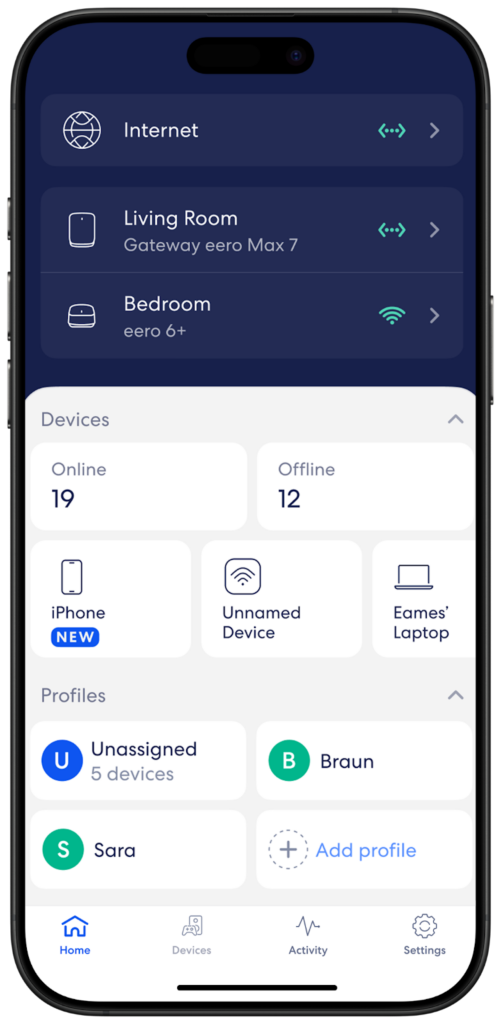
Unassigned profile looks and behaves like any other profile in the app. The only difference is under the hood—and that’s exactly where we want the complexity to live.
Gauging the options
We evaluated several approaches that all fell into two main categories: explicit assignment and implicit assignment. Think of it like a nightclub with a guest list. The explicit approach is like writing every person’s name on the list as they walk through the door—it works, but the list grows endlessly and the bouncer spends all their time writing instead of checking. The implicit approach is simpler: if your name isn’t already on the VIP list, house rules apply.
Explicit profile assignment: Every new device joining the network would be explicitly assigned to the unassigned profile in our cloud database. In fact, this is essentially how regular profiles already work—every device is explicitly assigned in the cloud. The appeal was that we could reuse the same pattern without changes to eero device firmware, which requires less coordination and could mean a faster release.
Implicit profile assignment: A special unassigned profile whose configuration would be applied to every unassigned device locally on the eero device, without creating an explicit relationship in the cloud database.
Weighing the trade-offs
The explicit assignment approach was attractive for its simplicity, because it required no firmware changes or cross-team coordination. But we identified several long-term concerns:

- Database scalability: Explicit device assignment would put additional load on our cloud database and configuration service—especially for networks where many guest devices connect and disconnect constantly, like a coffee shop running eero. Temporary MAC addresses that may never rejoin the network would bloat the profile-device relationships, requiring periodic cleanup for both scalability and privacy.
- Security surface: A flood of new guest device connections driving explicit database writes could open attack vectors for denial-of-service attacks. We would need to implement rate limiting and other countermeasures, which could impact network performance or time getting online when connecting.
- Latency: Every new device connection would trigger several back and forth messages between the eero and the cloud before policies could be applied, introducing a brief window where the device could operate without the intended restrictions.
The solution: cloud and device working together
Having ruled out purely cloud-side solutions due to scalability and security concerns, we settled on a design where the eero cloud and eero devices collaborate, splitting responsibilities to leverage their relative strengths.

The cloud’s role: The eero cloud creates and manages the unassigned profile—a special type of profile that behaves toward the end user exactly like a regular profile, but whose relationship with devices works differently under the hood. We removed the pieces that made a regular profile unsuitable for this purpose, such as explicit per-device database assignments, and created new internal data flows to address the scaling and security concerns we had identified.
The device’s role: Each eero node applies the unassigned profile’s DNS filtering policies to every device not explicitly assigned to another profile. It also manages the firewall rules needed to enforce connectivity pauses for unassigned devices, whether triggered by a schedule or by an ad-hoc action from the customer.
For pausing, this required inverting our traditional approach. Traditionally, eero pauses devices using a blocklist model: one firewall rule per paused device, matching its MAC address. But that doesn’t work when you don’t know the MAC addresses in advance—which is exactly the case for unassigned devices. So instead, the eero device maintains an allowed list of devices that should not be paused (eero nodes and devices explicitly assigned to other, non-paused profiles). Everything not on the allow list inherits the unassigned profile’s pause state. You can’t enumerate what you don’t know, so you flip the model.
What our customers are saying
When we rolled out the unassigned profile, the response from our community was immediate. One user called the new controls “****** brilliant” and others who had been waiting on this feature shared their excitement as it appeared on their networks. That kind of feedback is what makes this work worthwhile.
We’re continuing to build on this foundation—listening to our customers and giving families simple, powerful tools that work the way they expect.
Written by Luis del Toro, Senior Software Engineer on the Cloud Core team.
You must be logged in to post a comment.