
We rely on wifi for just about everything—our jobs, streaming, gaming, homework, and staying connected—and so do our kids. They are growing up in a world where nearly every device in our homes is connected to the internet, from tablets and laptops to smart TVs and gaming consoles.
That constant connectivity means more exposure to the online world than ever before, and more devices in their hands means it’s harder to keep track of online activity. That’s where parental controls come in. They are tools that empower parents to create healthy digital boundaries and safer internet spaces for their family by managing web access, screen time, and online safety to create customized internet experiences that apply whether they’re doing homework or just hanging out online. But research shows that even as concerns about social media, doomscrolling, and exposure to harmful content continue to rise, only about half of adults leverage parental controls for their children.
At eero, we want to change that. Our goal is to make safeguarding your family’s online experience as easy and approachable as everything else we do, giving you the tools and confidence to guide how your family connects.
Built-in Parental Controls for every eero home
Every eero user has access to a set of core Parental Controls designed to help keep your family safe. Available in the eero app, these tools are built for real life: schedule wifi around meals and bedtime, pause any device with a single tap, and get quick visibility into every device that connects to your network—with the option to automatically block access until you decide otherwise.
Individual profiles for customized control
Profiles are the foundation of Parental Controls in eero—it’s where you make personalized decisions about how your family interacts with the internet. A profile is a group of devices that share the same settings and rules. Think of it as a way to organize your home network around who’s online. Create a profile for each family member, assign devices to their profile, and any settings you choose apply to all of those devices at once. Whether you’re setting a bedtime schedule or blocking distracting apps, profiles make it easy to manage your family’s devices and online experience from one place.
Build better boundaries
Wifi Scheduling helps create healthier online habits. Set a custom schedule for your family’s individual profiles to automatically go offline at the right times—during homework, family meals, or bedtime. Every device in the profile follows the same schedule, making it easier to enforce screen-free time and support better sleep routines. It’s a simple way to help manage how much time your family spends online.
Restore focus
Need to act fast? With one tap in the eero app, you can pause wifi for a single device—whether it’s a phone buzzing at the dinner table, a gaming console making bedtime a battle, or an unfamiliar device that was added to your network. Pausing is on demand and won’t affect your existing schedules or network settings.
A new opportunity for more control over every connection
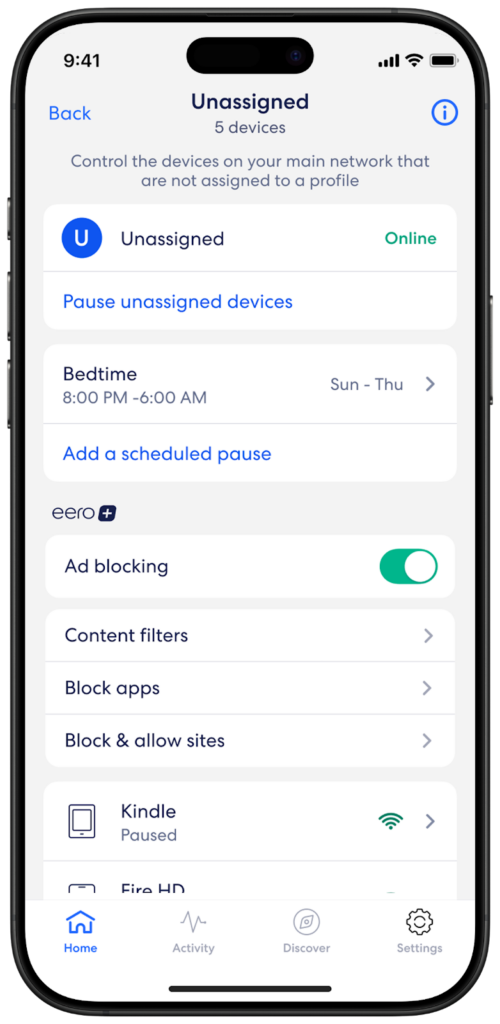
Even with the right parental controls in place, sometimes tech-savvy teens can work around their profile settings by rotating their device’s Media Access Control (MAC) address—a digital fingerprint that every device has—and reconnecting it as a seemingly new device. By rotating a MAC address, the fingerprint is changed so that it appears as a new or different device when it connects to wifi. That’s why we’ve added a new capability that comes standard with your eero: unassigned device controls. Get notified by your eero app when a new or unknown device joins your network and easily review all available device information in the unassigned profile. You can instantly pause these devices to prevent network access until you review them, apply automatic schedules to all unassigned devices, or assign them to a new or existing profile with parental controls already in place.
These built-in tools can make a real difference in day-to-day family life. But for households with older kids or multiple devices per person, a deeper layer of control and protection can make all the difference. That’s where eero Plus comes in.
Take security and control to the next level with eero Plus
eero Plus, our premium subscription service, enhances your eero experience with advanced networking features and expands on the core Parental Controls already in the app, giving you more control to shape how your family uses the internet. These expanded features are designed for households that want more visibility and customization, offering tools that adapt and grow with your family.
Keep your family’s online experience age-appropriate
Keep the internet age appropriate with eero Plus Content Filters. Block access to content categories like adult content, violence, and illegal activity, while enabling safe search and YouTube Restricted Mode. Simply select the level of content restrictions you would like to enable for each profile—from most restrictive to no restrictions at all—to apply preset filtering across all devices. You can tailor the preset filters to match the needs of each profile and easily update the filter restriction level as those needs change. These filters can also be applied to the unassigned devices profile, so even if someone adds a new device or tries to bypass restrictions by rotating their MAC address, the content protections remain in place.

Reduce distractions without disconnecting
App blocking is a quick way to limit access to apps that may be distracting or inappropriate. When enabled, devices in a selected profile—including unassigned devices—can’t open specific apps, helping cut back on social media use, streaming, or anything else pulling focus. Choose from a list of popular apps or search for specific ones you want to restrict. It’s a targeted layer of control that supports healthier screen-time habits without cutting off internet access entirely.
Set your own boundaries
Want even more control? Create a customized list of blocked and allowed sites for each profile. By entering individual URLs, you can override content filters to grant or restrict access to specific sites—whether that’s a gaming platform, a streaming service, or anything in between.
With eero Plus advanced Parental Controls your family has even more guardrails, visibility, and flexibility to shape how your family uses the internet.
A safer online experience starts here
Creating a safe digital environment doesn’t have to be complicated. Every eero system comes with core Parental Controls built right into the app at no additional cost, giving you essential tools to manage your family’s internet usage from day one.
If you’re looking for even more protection, upgrade to eero Plus—our premium monthly or annual subscription service—for advanced Parental Controls, privacy features like Identity Protection, and additional layers of security that grow with your family. Whether or not you’re an eero Plus subscriber, we want you to know we are always innovating, adapting, and building new features for a safer online experience.
Your family’s digital well-being is our priority, and with eero you’re never navigating it alone. Check out the parental controls available to you today in your eero app.

You must be logged in to post a comment.