Key takeaways
- Mesh wifi improves whole-home coverage, but wireless networks can still slow down when lots of devices are online at once.
- Plugging your mesh nodes into your router with Ethernet cables, rather than relying on a wireless connection, frees up bandwidth and improves speed, stability, and latency.
- A wired connection between nodes is especially helpful for real-time and high-bandwidth activities such as video calls and gaming.
- To set it up, confirm your mesh system supports Ethernet backhaul, connect the nodes to Ethernet (or a switch), and verify in the app that the nodes are using a wired connection.
- For best results, use Cat6 or higher Ethernet cables, keep runs straightforward, and stay up to date with firmware updates.
Enhancing your network: mesh wifi with Ethernet backhaul
You’re on an important video call, presenting to your team, when suddenly—lag. Your screen freezes, voices distort, and you scramble to reconnect.
Your wifi should work when you need it most, but traditional single routers often fail to deliver. Thick walls, multiple floors, and network congestion create dead zones and dropouts.
With Ethernet backhaul, your mesh nodes use a wired cable to connect to each other rather than relying on a wireless link.
eero’s TrueMesh technology means your wifi works great either way—wirelessly or wired. Wireless mesh provides flexibility and ease of setup, while a wired connection can offer additional performance advantages when available. eero maximizes the outcome in either scenario, automatically routing traffic for the best possible connection.
If you have Ethernet available, or can add it, wired backhaul can help reduce congestion and keep performance more consistent for things like video calls, streaming, and gaming.
The evolution of home networking

The way we connect to the internet has changed dramatically over the years. There was a time when a single router tucked away in the corner of the house was tolerated. But as our online needs have grown, traditional wifi setups are often no longer up to the task.
We now stream high-definition movies, play graphics-heavy video games, work remotely, and connect multiple smart devices—all at the same time. Under these tasks, traditional wifi routers can experience:

Weak signals – Walls, floors, and furniture block signals, leaving frustrating dead zones.

Interference – Nearby networks and household electronics can disrupt performance.

Network congestion – Too many devices fighting for bandwidth can slow speeds and lead to buffering.
Mesh wifi takes connectivity to the next level, delivering seamless, high-speed coverage throughout your entire home. Using multiple nodes, it adapts to your needs to:

Help reduce dead zones – Additional access points (wifi broadcasters) can extend coverage to more areas of your home.

Provide seamless switching – Devices automatically connect to the strongest node.

Handle heavy traffic – Designed to support multiple users streaming, gaming, and working at once.
If you’re trying to improve wifi signal through walls, a mesh system or repositioning your router strategically can help improve connectivity. That said, even with this comprehensive coverage, mesh wifi systems can still experience congestion when multiple devices demand a large amount of bandwidth at the same time, such as when several people are streaming videos or working with large files. You may also notice slowdowns in busy areas (like apartments or dense neighborhoods) where many nearby wifi networks can interfere with each other.
Fortunately, Ethernet can help.
The role of Ethernet in modern networks

For many homes, wifi is the best fit because it’s flexible and easy to set up. But because wifi travels through the air, performance can be affected by walls, interference, and network congestion, especially when lots of devices are online at once. Ethernet can help by adding a wired connection that often delivers more consistent performance in the areas where you use it.
Namely, Ethernet provides:
- Steady, reliable speeds – By way of a physical cable, Ethernet maintains a stable connection. As such, you’re unlikely to experience sudden slowdowns due to network congestion.
- Lower latency – Ethernet significantly lowers latency, the delay between sending and receiving data between devices. This can be especially helpful for ultra fast browsing and activities that require real-time interaction, such as gaming and video calls.
- No interference – Household electronics, thick walls, copper cables, and neighboring networks can disrupt the wifi signals within your home. Fortunately, Ethernet provides a direct network connection that protects your signal from interference.
Adding a wired connection to your mesh wifi is as simple as plugging an Ethernet cable into your eero—the app will confirm everything is set up and working correctly. The result? Faster, more reliable wifi that’s fully optimized for high-bandwidth activities like 4K streaming, gaming, and video conferencing, without lag or dropouts.
Understanding mesh wifi systems
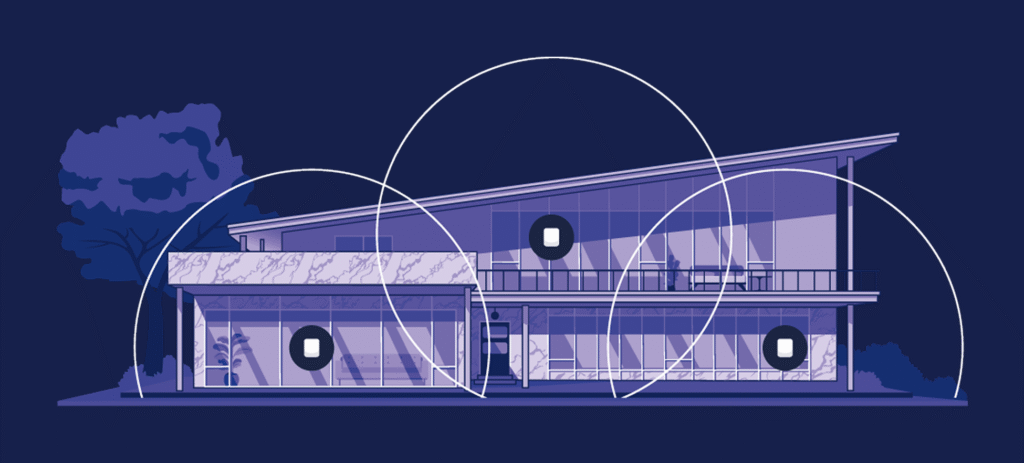
Instead of relying on a single main router to push wifi throughout your home, mesh networks use multiple interconnected nodes that work together. Each node acts as both a transmitter and a receiver, passing the signal along like a relay race to ensure consistent coverage in every room.
Key features of mesh wifi include:
- Intelligent communication – Nodes constantly analyze network traffic and adjust connections for the best performance.
- Dynamic routing – If one node loses connection, the system automatically reroutes data through another path to keep everything running smoothly.
- Automatic optimization – Devices seamlessly switch between nodes based on proximity and signal strength, so you’re always connected to the best possible signal.
- eero smart features – TrueMesh optimizes routing, TrueRoam helps devices roam smoothly between nodes, and TrueChannel picks clearer wifi channels automatically.
By working together as a team, mesh wifi systems can improve coverage and help your devices stay connected as you move around your home.
If you already have a router and want to improve coverage without replacing your entire system, you can add mesh to existing router setups. Mesh wifi with Ethernet backhaul delivers even faster, more reliable connections by combining physical wired connections and wireless connections to link mesh nodes and creates a high-speed pathway for data.
Delving into Ethernet backhaul
Mesh wifi is already a huge step up from traditional wifi routers, but even the best wireless systems can get bottlenecked. By connecting your mesh nodes with Ethernet cables, you create a dedicated, high-speed pathway for data to travel.
In this section, we’ll break down what Ethernet backhaul is, why it matters, and how it can transform your home network.
What is Ethernet backhaul?
Backhaul is the way data moves between different access points in a network. In a mesh wifi system, backhaul refers to how nodes communicate with each other to deliver a seamless internet connection.
That said, there are two types of backhaul:
- Wireless backhaul – Nodes communicate over wifi, but since they share bandwidth with all your other devices, congestion can slow things down.
- Ethernet backhaul – Nodes connect with Ethernet cables, creating a dedicated, high-speed pathway that eliminates interference and frees up wireless bandwidth.
By using Ethernet backhaul, your mesh network operates more efficiently, delivering faster speeds, lower latency, and more consistent performance, especially during busy network moments.
Advantages of Ethernet backhaul in mesh system
Ethernet backhaul offers a range of benefits, which include:
- Stronger, more reliable connections – Wired connections aren’t disrupted by walls, networks, or household devices, providing consistent speeds. As such, there are no sudden drops or congestion-related slowdowns. It also limits lag when gaming or hopping on video calls.

- Cleaner installs with PoE-capable eeros – If you’re using select eero PoE devices, one Ethernet cable can deliver both power and data. That can reduce clutter, eliminate the need for a nearby power outlet, and make wall- or ceiling-mounted installs look more seamless.
- More wireless bandwidth for devices – With uninterrupted traffic, even in busy homes, individuals can operate their phones, laptops, and smart gadgets with uninterrupted access, allowing one or more people to stream, game, and work at once.
- Optimized for heavy traffic – This system handles heavy traffic with ease, providing stable performance even when multiple users are online. Whether you’re streaming 4K video or gaming, you’ll experience smooth, uninterrupted connections. It’s also ideal for smart homes, keeping IoT devices running seamlessly without any lag.

With Ethernet backhaul, your mesh network becomes faster, stronger, and effortlessly reliable, no matter how many devices you connect.
Implementing Ethernet backhaul in your mesh wifi system
Getting started with Ethernet backhaul is easier than you might think. From checking your existing setup to optimizing your placement, here’s everything you need to know to seamlessly integrate Ethernet backhaul into your network.
Assessing your network setup
Before setting up an Ethernet backhaul, assess your current network setup to ensure compatibility and smooth integration. Here’s what to prioritize:
- Check your mesh system – Not all mesh networks support an Ethernet backhaul. Consult the product specifications or user manual to confirm that your mesh wifi system can accommodate it.
- Look for Ethernet ports – Make sure there are available Ethernet ports near your mesh nodes, as these are essential for connecting to the wired backhaul. If your nodes are far from the main router or switch, you may need to run additional Ethernet cables. Port speed note: 2.5GbE and 5GbE indicate a port’s maximum wired speed. In practice, the connection runs at the speed of the slowest link in the chain—that includes the Ethernet ports on both ends, plus any switch and cabling in between.
- Confirm router and switch capacity – Ensure your wifi router and switches have enough Ethernet ports to handle added wired connections from the mesh nodes. If you don’t have enough ports, you might need to invest in a switch to expand your network’s capacity.
If you’re planning multiple wired nodes and want a cleaner install, eero PoE Gateway
is an option to consider. It supports Power over Ethernet (PoE), which can reduce cable clutter by delivering power and data over a single Ethernet run for compatible devices.
Steps to set up Ethernet backhaul
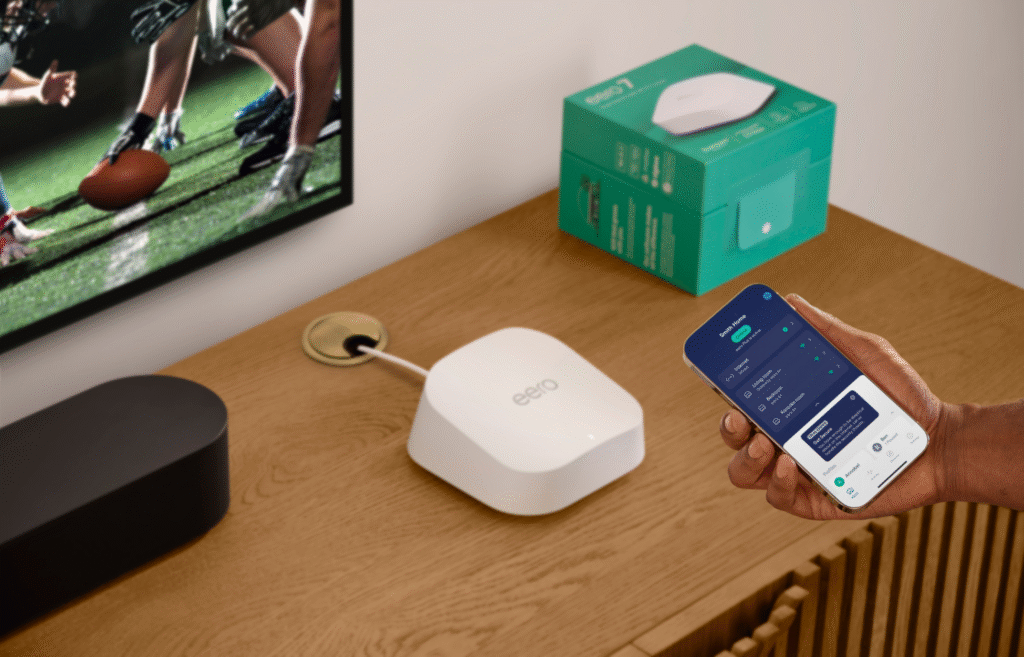
Setting up Ethernet backhaul is easier than it sounds. A few simple steps can make a huge difference, delivering faster speeds and stronger connections for your mesh wifi system.
- Position mesh nodes strategically – Place nodes where they provide the best coverage for your home and prioritize wired connections in key areas like home offices and entertainment spaces.
- Connect nodes via Ethernet cables – Select Ethernet cables with sufficient speed capacity and position your mesh nodes throughout your home. Simplify setup with the eero PoE Gateway, which makes it easy to connect multiple eero nodes via Ethernet.
- Configure your mesh system – Enable Ethernet backhaul mode in your system settings and verify that each node is recognized as wired in the network app.
- Test the network – Run speed tests to compare wired vs. wireless performance. Check that all nodes are optimizing coverage and delivering consistent speeds.
By following these steps, you’ll create a faster, more reliable mesh network that keeps up with your household’s connectivity demands.
Best practices for optimal performance
To get the best out of your Ethernet backhaul setup, a few small tweaks can make a big difference in speed and stability:
- Use high-quality Ethernet cables – Stick with Cat6 or higher for the fastest speeds and least interference.
- Keep cable runs short – The longer the cable, the higher the chance of signal loss. Keep it direct and efficient.
- Stay up to date – Regular firmware updates for your mesh system and devices help optimize performance and security.
Comparing mesh wifi systems with and without Ethernet backhaul
Not all mesh wifi setups are created equal.
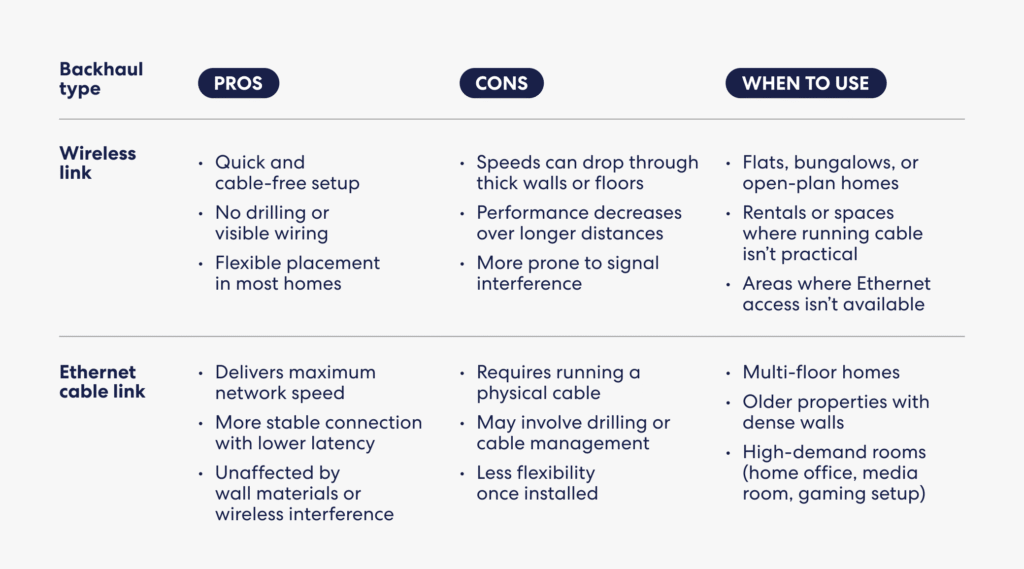
Wireless backhaul can get the job done, but it shares bandwidth with all your other devices, leading to congestion, lag, and slower speeds.
Ethernet backhaul creates a dedicated wired connection, ensuring faster speeds, lower latency, and a network that stays consistent under pressure.
Performance metrics
When comparing mesh wifi systems, speed and efficiency make all the difference:
- Speed and latency – Ethernet backhaul consistently delivers faster, more stable speeds and reduces lag compared to wireless setups.
- Bandwidth availability – Wireless backhaul competes with your devices for bandwidth, while Ethernet backhaul keeps wireless capacity free, ensuring smoother streaming, gaming, and video calls without slowdowns.
For peak performance and reliability, Ethernet backhaul is the clear winner.
Elevate your network with Ethernet backhaul
Your network should be fast, stable, and ready for anything—not a constant source of frustration. Mesh wifi is a solid upgrade, and if you can add Ethernet backhaul, you may see even more consistent performance during high-bandwidth moments.
If you’re ready to upgrade, eero mesh wifi makes it simple to expand coverage and add wired backhaul where it makes sense for your home.
With mesh wifi and Ethernet backhaul, say goodbye to buffering, lag, and frustrating connectivity issues—it’s time to give your home the network it deserves. And if you’re planning a cleaner wired setup, Power over Ethernet (PoE) can help reduce cable clutter by delivering power and data over a single Ethernet run.

Sources:
EMACS. WiFi Signal Strength Degradation Over Different Building Materials.
Media of Computer Science. Wi-Fi Optimization with Wireless Mesh Networks.
Introduction to Wireless Communications and Networks. Backhaul Network.

You must be logged in to post a comment.